
Operational Efficiency
The Force Multiplier for everything else
Even with well-designed systems, appropriate cooling, and the right accelerators, poor operational practices can leave a huge amount of performance, efficiency, and budget on the table. In many data centers, the difference between an acceptable outcome and a truly efficient one comes down to how effectively the entire environment is managed on a day-to-day basis.
Operational efficiency acts as a force multiplier for all the layers below it — assessment, cooling, systems, and components. When done well, it can significantly increase utilization, reduce wasted power and cooling costs, lower risk, and delay or avoid expensive hardware refreshes. For the executives who ultimately approve these investments, strong operational practices are often one of the highest-ROI levers available.
This section breaks operational efficiency into five interrelated layers that build on each other:
- Application & Workflow Profiling
- Workload Management & Scheduling
- Utilization & Performance Monitoring
- Operations & Policy Control
- Throughput & Business Outcomes
When these layers work together, they create a positive feedback loop: better visibility leads to better decisions, which leads to better outcomes, which in turn makes the next round of optimization easier.
The Operational Efficiency Stack
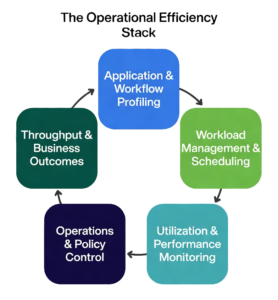
These five layers form a virtuous cycle — improvements in one layer strengthen the others, compounding efficiency gains over time.
Even with well-designed systems, appropriate cooling, and the right accelerators, poor operational practices can leave a huge amount of performance, efficiency, and budget on the table. Operational efficiency acts as the force multiplier for everything else in your data center.
This stack consists of five interrelated layers. Each layer has meaningful differences in scope and complexity, and the right approach depends on the scale and nature of your workloads.
1. Application & Workflow Profiling Understanding how your applications and workflows actually consume resources (CPU, memory, GPU/accelerator, network, storage) is the foundation. Profiling a single application on one node is relatively straightforward. Profiling complex, distributed workflows — especially those with new AI components — is significantly harder and requires different tools and expertise. Good profiling reveals hidden inefficiencies, dependencies, and optimization opportunities. Profiling turns guesswork into actionable insight.
2. Workload Management & Scheduling Once you understand the workloads, intelligent scheduling and resource allocation become critical. Simple batch scheduling is very different from managing mixed environments with both traditional enterprise apps and latency-sensitive AI inference or training jobs. Effective scheduling dynamically packs jobs, balances utilization, and prevents resource contention or idle accelerators. This layer turns visibility into action.
3. Utilization & Performance Monitoring Real-time and historical monitoring goes far beyond basic CPU/GPU usage graphs. You need visibility into meaningful metrics: effective throughput, power draw per workload, thermal headroom, and queue wait times. Monitoring a small cluster is manageable; monitoring a large, heterogeneous environment with rapidly changing AI workloads requires more sophisticated tools and dashboards. Good monitoring provides the feedback needed to continuously improve.
4. Operations & Policy Control This layer translates insight into automated policies — power capping, workload throttling, maintenance windows, and governance rules. Policies suitable for stable enterprise workloads are very different from those needed when AI jobs can cause sudden power and thermal spikes. Strong policy control prevents small issues from becoming expensive outages or efficiency losses. Effective policy control turns insight into consistent behavior.
5. Throughput & Business Outcomes The ultimate measure is not raw utilization, but actual business value delivered — jobs completed per day, inference latency, model training time, or simulation accuracy per dollar and per watt. Tracking outcomes for simple workloads is easy. Doing it meaningfully across a diverse, AI-augmented environment is much more challenging and far more valuable. The goal is not just high utilization, but useful work that supports the business.
When these five layers operate as a cohesive system, they create a positive feedback loop: better profiling improves scheduling, better monitoring enables smarter policies, and improved outcomes justify further investment in visibility and control.
Technology & Tools
Application & Workflow Profiling
This is the foundational layer of the operational efficiency stack. It focuses on how workloads actually execute on your hardware — revealing where time and resources are truly being spent (and often wasted).
Profiling tools show how code runs on CPUs, GPUs, memory, and storage. They can expose idle GPUs waiting for data, memory bandwidth bottlenecks, poor parallelization, excessive data movement, or synchronization delays. In distributed environments, profiling can extend across multiple nodes to uncover system-wide issues.
Some tools give a high-level overview of system behavior, while others drill deep into individual kernels or functions. More advanced solutions go further — not only identifying problems but also suggesting optimizations and highlighting opportunities to improve parallelism and hardware utilization.
Because this layer sits closest to actual execution, it frequently reveals the root causes of inefficiency. Improvements made here tend to carry upward through the rest of the stack, delivering gains in utilization, throughput, and overall cost efficiency.
In many data centers, the fastest way to improve performance and efficiency is to start with strong profiling.
(The list below isn't comprehensive, but represents some of the most widely used profiling tools in AI, HPC, and enterprise computing.)
Company/Organization | Profiler/Tool name | Additional Details |
Nvidia | Nsight Systems (single/multiple nodes), Nsight Compute | Nvidia GPU-based environments; system-level (including I/O and MPI), Nsight Compute profiles CUDA at kernel-level. |
Intel | CPU, GPU performance, system or application, single or multi-node, MPI | |
AMD | Low-level, system performance, parallel multi system applications profiling. Open source | |
University of Utah | Profiles CPU, GPU, and communication across multi-node workloads (MPI) | |
ParaTools | Common in HPC environments for MPI and large-scale profiling | |
University of Oregon | Supports comprehensive list of hardware, fully featured, jointly developed by LLNL/ANL, U of Oregon | |
Linaro | Pinpoints bottleneck to source line Aggregates performance metrics with advice for optimizations | |
Oak Ridge National Lab | Highly scalable profiling and event tracing |
Workload Management & Scheduling
Once you understand how your workloads behave through profiling, the next critical step is managing and scheduling them effectively across your systems.
This layer determines how efficiently resources are allocated in practice. Good workload management dynamically assigns jobs to the right resources at the right time, balances competing demands, prevents resource contention, and minimizes idle time — especially important for expensive accelerators.
The difference between simple batch scheduling and modern workload management is significant. Basic schedulers handle straightforward queues, while advanced tools manage complex, mixed environments that include both traditional enterprise applications and latency-sensitive AI inference or training jobs. They can prioritize critical workloads, pack jobs more intelligently, and respond dynamically to changing conditions.
Effective scheduling directly impacts utilization, power consumption, and overall throughput. Poor scheduling is one of the most common hidden causes of low accelerator utilization and inflated operating costs.
Strong workload management turns the visibility gained from profiling into real, measurable efficiency gains.
Management Scope | Company/Organization | Platform/Tools | Additional Details |
Cluster / Job Scheduling | SchedMD (now Nvidia owned) | Dominant scheduler in HPC and AI clusters | |
Cluster / Job Scheduling | IBM | Widely used in enterprise HPC environments | |
Cluster / Job Scheduling | Altair | Long-established scheduler in HPC environments | |
Cluster / Job Scheduling | Adaptive Computing | Legacy but still present in some environments | |
Container / Orchestration | Cloud Native Computing Foundation | Increasingly used for AI/ML and modern workloads | |
Container / Orchestration | Red Hat | Enterprise Kubernetes platform with additional controls | |
Job Scheduling & Orchestration | Nvidia | Integrates scheduling, orchestration, and AI workflows | |
Job Scheduling & Orchestration | Hewelett Packard Enterprise | Combines cluster management and workload scheduling | |
Job Scheduling & Orchestration | Penguin Solutions | Integrated cluster management and scheduling platform, hardware agnostic | |
Job Scheduling & Orchestration | Eviden | Integrated scheduling, orchestration, and workflow management across HPC and AI workloads |
Utilization & Performance Monitoring
This layer answers one of the most important questions in any data center: Are we actually using what we have?
Utilization monitoring provides visibility into how CPUs, GPUs, memory, storage, and networks are consumed over time across workloads and users. It reveals imbalances that are often hidden — some resources may be saturated while others sit idle, GPUs may be waiting on data, or workloads may be unevenly distributed.
Many organizations discover that their systems are far less utilized than they appear. This is where “ghost systems” are found — infrastructure that remains powered on and cooled even though the workloads it was built for have been retired, moved, or replaced. Identifying and decommissioning ghost systems can free up significant power, cooling, and floor space with little or no impact on production capacity.
Good monitoring goes beyond simple CPU or GPU usage graphs. It tracks meaningful metrics such as effective throughput, power draw per workload, thermal headroom, and queue wait times. It also shows how usage patterns change over time, highlighting trends, peak demands, and opportunities for optimization.
Visibility alone is not enough, however. The real value comes when this data is used to drive action — adjusting scheduling, refining placement decisions, or updating policies. In this way, utilization monitoring connects directly back to profiling and workload management, closing the feedback loop.
(These are some of the vendors and packages that can monitor utilization. Not an exhaustive list, there are others out there, but these are well known.)
Monitoring Scope | Company/Organization | Platform/Tools | Additional Details |
Hardware / Resource Monitoring | Nvidia | Nvidia GPU utilization, health, and performance monitoring with alerting | |
Hardware / Resource Monitoring | Intel | CPU and system-level telemetry and performance tracking | |
Cluster / System Monitoring | ClusterVision | Integrated cluster management platform with built-in monitoring, tracking, and alerting (Prometheus/Grafana-based) | |
Cluster / System Monitoring | Hewlett Packard Enterprise | Includes cluster monitoring, utilization tracking, and alerting | |
Cluster / System Monitoring | Penguin Solutions | Integrated cluster monitoring and workload visibility | |
Monitoring, Tracking & Alerting Platforms | Prometheus | Metrics collection, time-series tracking, and alerting | |
Monitoring, Tracking & Alerting Platforms | Grafana Labs | Visualization and dashboards for utilization and system metrics | |
Monitoring, Tracking & Alerting Platforms | Datadog | Integrated monitoring, tracking, and alerting platform | |
Monitoring, Tracking & Alerting Platforms | Splunk | Log, metric, and event-based monitoring with analytics and alerting | |
Monitoring, Tracking & Alerting Platforms | Nvidia | Includes monitoring dashboards and workload-level utilization tracking | |
Monitoring, Tracking & Alerting Platforms | Eviden | Workflow-level monitoring, tracking, and system-wide visibility |
Operations & Policy Control
This is the layer where intent meets reality — where system capacity is either put to productive use or quietly wasted.
Operations and policy control determine how resources are allocated across users, workloads, and priorities. They define who gets access to what, under which conditions, and with what level of importance. Even with excellent profiling, scheduling, and monitoring, poor policy control can still lead to suboptimal outcomes: high-value workloads being delayed, low-priority jobs consuming disproportionate resources, or systems being used in ways that don’t align with business goals.
Left unmanaged, systems naturally optimize for activity rather than value. Policy control changes that.
It enables organizations to set and enforce clear priorities — accelerating critical workloads, ensuring fairness across teams, reserving capacity for key projects, or carefully managing access to scarce resources like GPUs. These policies are typically implemented through workload managers, orchestration platforms, and higher-level control systems.
However, defining policies is only half the challenge. They must also be regularly evaluated and adjusted as workloads evolve, priorities shift, and new demands emerge. Policies that worked well six months ago can quickly become inefficient or even counterproductive.
This layer is where operational discipline matters most. It requires not just good tools, but ongoing attention to whether actual system usage reflects the organization’s true objectives.
This is ultimately where the real value of your infrastructure is determined.
Many of the vendors and platforms listed here have appeared in earlier sections.
This is intentional.
Operations and policy control are not handled by a completely separate set of tools. Instead, these capabilities are built into workload managers, orchestration platforms, and cluster management systems that have already been discussed.
The table below focuses specifically on how those tools control and govern system usage. It's not a comprehensive list, it's a curated set of vendors and platforms that are most commonly encountered in real-world deployments. The goal is to illustrate how policy and control are implemented in practice, not to catalog every available tool.
Policy/Control Function | Company/Organization | Platform/Tools | Additional Details |
Priority & Fair-Share Control | SchedMD (now owned by Nvidia) | Enforces priorities, queues, fair-share, and resource allocation policies | |
Priority & Fair-Share Control | IBM | Advanced policy control, workload prioritization, and resource management | |
Priority & Fair-Share Control | Altair | Queue structures and policy enforcement for workload prioritization | |
Access & Resource Allocation Control | Cloud Native Computing Foundation | Resource quotas, namespaces, and policy-based workload isolation | |
Access & Resource Allocation Control | Penguin Solutions | Integrates scheduling with system-level control and allocation policie | |
Access & Resource Allocation Control | Red Hat | Enterprise-level policy enforcement and resource governance | |
Access & Resource Allocation Control | Hewlett Packard Enterprise | Controls system access, resource allocation, and operational constraints | |
Workflow & Organizational Governance | Nvidia | Policy-driven orchestration of AI workloads and resource usage | |
Workflow & Organizational Governance | Eviden | Governs workflows, resource usage, and execution policies across environments | |
Workflow & Organizational Governance | ClusterVision | Integrates monitoring, scheduling, and policy control at the cluster level |
Throughput & Outcomes
While the previous layers focus on tools and technical execution, this final layer is different. It measures whether the infrastructure is actually delivering real value to the organization.
Throughput and business outcomes are ultimately determined by how well the systems support the people and processes they exist to serve — whether that means running business applications, accelerating research, optimizing production schedules, or powering AI-enhanced workflows.
The users of these systems are the true customers of IT. They are the ones who decide if the investment is paying off.
Measuring success at this layer requires looking beyond technical metrics like utilization or job completion rates. It means regularly checking in with stakeholders to understand whether workloads are completing fast enough, whether applications are responsive enough, and whether the infrastructure is truly enabling — rather than hindering — their objectives.
This can be done through structured feedback sessions, user surveys, or ongoing dialogue with key teams. The specific method matters less than the discipline of doing it consistently.
When you ask, you will hear complaints. That’s normal and valuable. What matters is how those issues are acknowledged and addressed. Over time, this responsiveness builds trust, improves communication, and helps align IT capabilities more closely with real business needs.
This layer closes the loop on the entire operational efficiency stack. It turns technical improvements into measurable business value and creates a continuous cycle:
Measure → Respond → Improve → Repeat.
Vendors included on this site are selected based on technical relevance and real-world deployments.